
Types of Requests
What can you submit through the portal?
Architectural Review (ARC)
Submit requests for modifications to your home or property. Based on your governing documents, changes may require approval. Includes landscaping, exterior changes, additions, or improvements.
General Resident Requests
Submit questions or requests directly to your management company. Each request type has predetermined fields to ensure all necessary information is captured and routed automatically.
Document Requests
Request copies of governing documents, meeting minutes, financial statements, or other community records.
Step-by-Step Guides
Choose your request type to see detailed instructions
Login to Portal
Access the Community Portal with your credentials
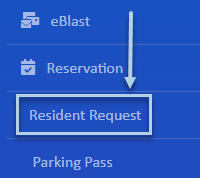
Click Resident Request
Select the Resident Request button from the menu on the left
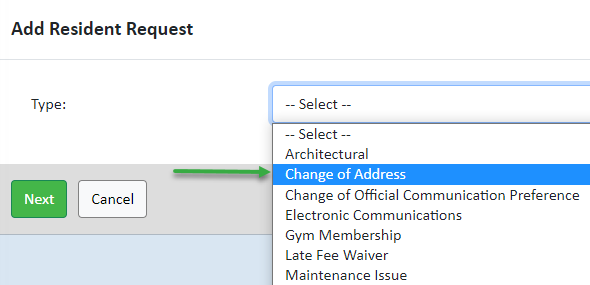
Select Request Type
Choose the correct type of request from the dropdown menu
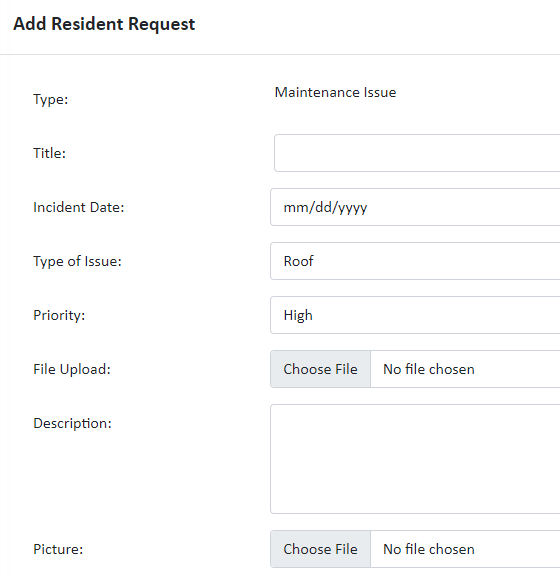
Complete Fields
Fill out all required fields. Available fields vary based on request type
Save & Submit
Click the Save button to submit your request for processing
Why Use Online Requests?
Benefits of submitting requests through the portal